How to Mount an Action Camera on a Bike Handlebar
To mount an action camera on a bike handlebar, you need a clamp mount sized for your handlebar’s diameter (most road and mountain bike bars measure 22mm to 32mm), a camera adapter that matches your specific camera’s mount type, and a stable attachment point away from your brake and gear cables. The whole process takes under five minutes once you have the right clamp.
What You’ll Need
- A clamp mount rated for your handlebar diameter (check both the minimum and maximum clamp range before buying)
- The correct adapter for your camera — GoPro’s standard mount, Insta360’s mount, and DJI’s mount are all different, so confirm your clamp includes or supports the right one
- A hex key or the tool included with your mount, if it uses a screw-tightened clamp rather than a quick-release lever
Step-by-Step
- Choose your mounting position. The center of the handlebar, just inboard of your grips, is the most common spot — it keeps the camera stable and out of the way of your hands and brake levers.
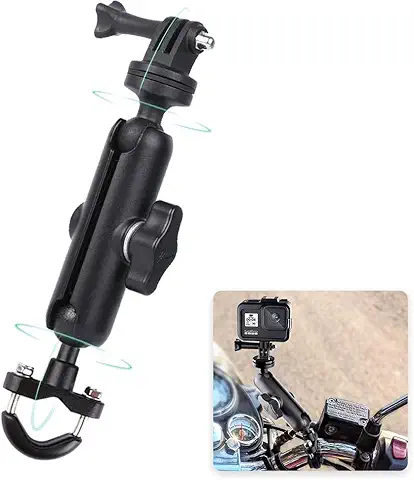
- Check the clamp range. Confirm your handlebar’s diameter falls within the clamp’s stated range. A clamp mount for 22mm to 38mm handles most road, hybrid, and mountain bike bars; oversized MTB bars sometimes need a wider-range clamp.
- Position and tighten. Open the clamp, wrap it around the bar, and hand-tighten before doing a final tightening with a hex key if required. It should not rotate or slide when you push firmly on the camera.
- Attach the camera adapter. Screw or click your camera’s specific mount adapter into the clamp’s ball head or mount point.
- Set the angle. Most clamp mounts include a ball-and-socket or hinge joint — angle the camera slightly downward from level to account for the natural upward tilt of handlebar-mounted shots.
- Test before you ride. Push and twist the camera by hand to confirm there’s no play in the clamp before heading out.
Common Mistakes to Avoid
- Mounting too close to brake or gear cables, which can interfere with cable movement or get pinched by the clamp
- Under-tightening the clamp, which causes camera drift or rotation over rough terrain — always do a final hand-check before riding
- Ignoring the clamp’s rated diameter range, which can either fail to grip properly (too loose) or crack the clamp material (over-tightened past its rated range)
- Mounting directly in your sightline, which can obstruct your view of the road or trail ahead
Frequently Asked Questions
What size clamp do I need for my bike?
Most road and mountain bike handlebars measure between 22mm and 32mm in diameter. A clamp rated for 22mm to 38mm covers the vast majority of bikes; check your specific bar with a tape measure if you’re unsure.
Can the same clamp mount a GoPro and an Insta360 camera?
Only if the clamp supports both mount types, either through an included dual adapter or a standard ball-head that both camera brands’ adapters can attach to. Check the product listing for confirmed compatibility with both.
Is it safe to mount a camera on the handlebar itself, or should I use the stem?
The handlebar is the more common and generally safer choice, since it keeps the camera further from your direct steering input and out of your hands’ path. Stem mounts are an alternative for a more centered, stable angle.
Need Help Choosing the Right Adofys Accessory?
Adofys (Homeekart Trading Services) 117 Markanda Complex, Sena Nagar, Dhulkot, Ambala City, Haryana – 134003, India GST: 06AAKFH8394J1ZR
Reach out with any compatibility or sizing questions before you buy — our team is happy to help you pick the right fit .you can find our website on google too .